How to Set Up a Referral Program in Referi
Word-of-mouth is one of the most trusted ways new shoppers find a store. With Referrals in Referi, you reward your customers with store credit when the friends they invite become new customers, turning happy shoppers into a steady growth channel.
How the referral program works
A referral involves two people: the referrer, an existing customer who shares their link, and the referee, the friend who visits your store through it.
- The referrer shares their link. Signed-in customers get their own unique referral link in the Referi launcher. They can copy it or share it directly by Facebook, X, or email, depending on the channels you turn on.
- The friend visits your store. Opening the link takes them to the page you chose as the referral link destination.
- The friend claims their reward. If referee rewards are on, the launcher opens automatically and invites them to sign in. Depending on your settings, their credit is added right after they sign in, or after they make a qualifying purchase.
- The referrer earns store credit. Once the friend's order is fulfilled and meets your program conditions, the referrer receives their credit and sees a notification in the launcher.
Open and activate Referrals
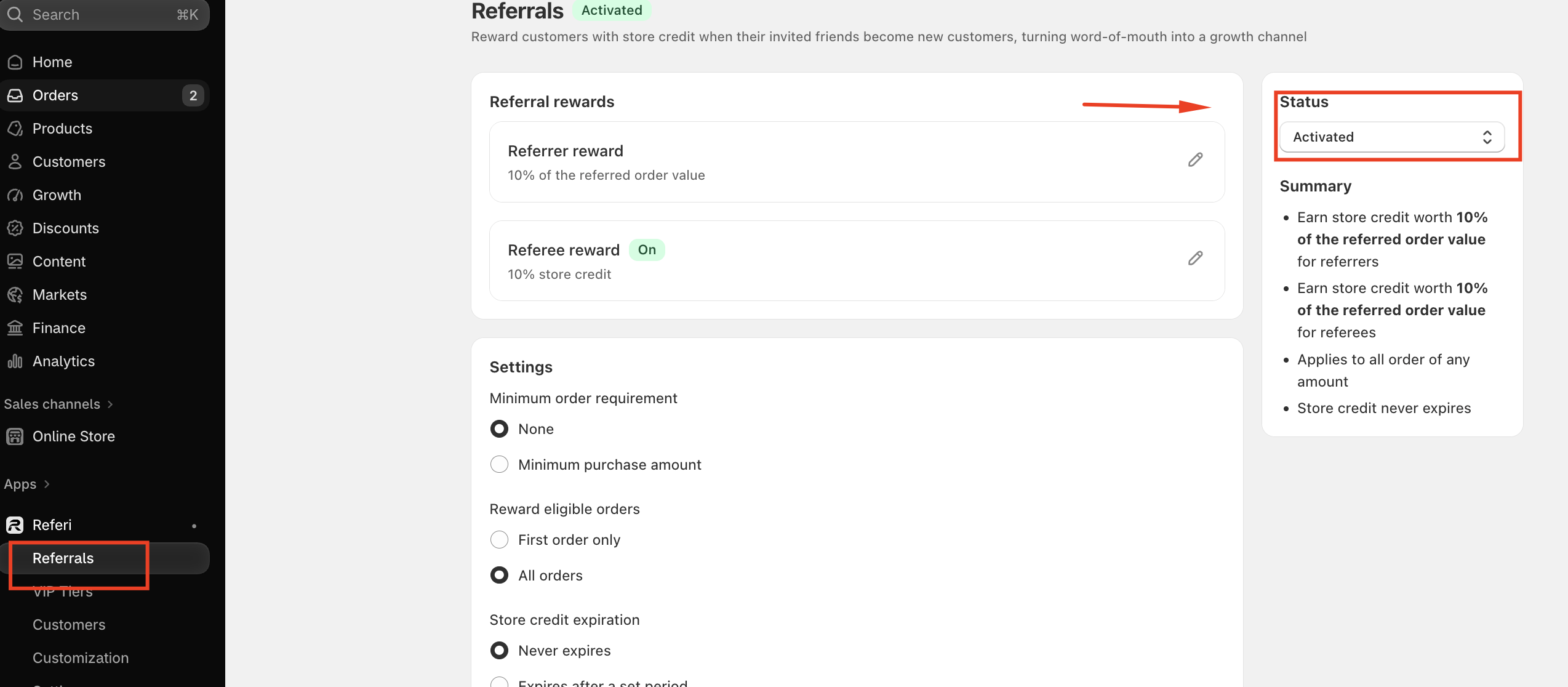
- In your Shopify admin, go to Apps > Referi > Referrals.
- Under Status on the right, change the program from Deactivated to Activated. Referrals are deactivated by default, so customers won't see the program until you switch it on.
Set up referral rewards
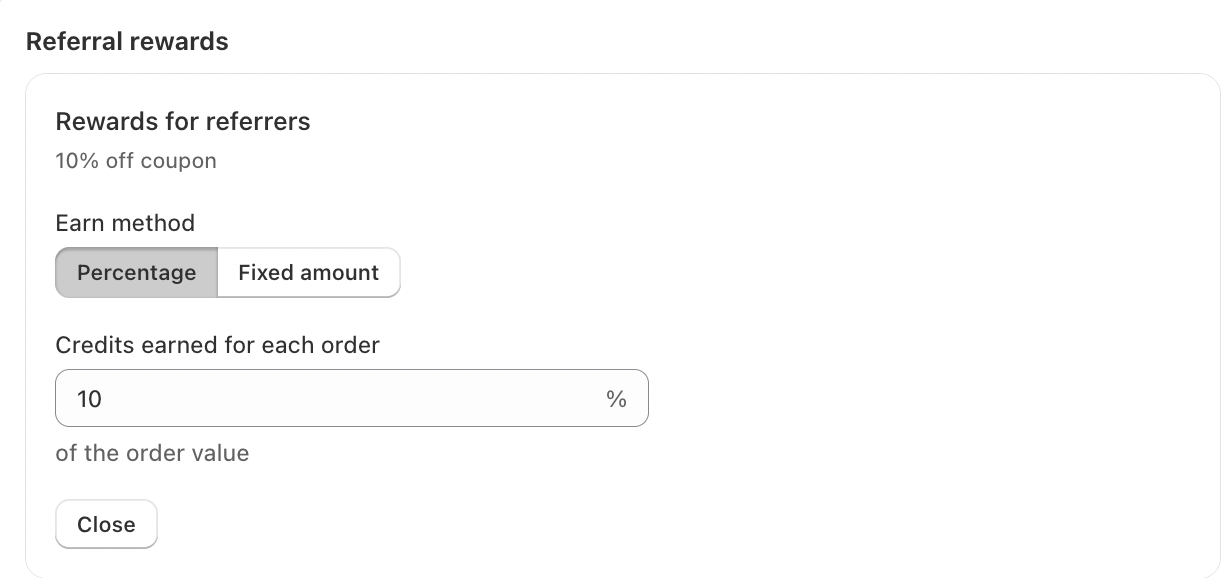
Rewards for referrers
This is what your existing customers earn for each successful referral.
- Earn method: choose Percentage (the default) or Fixed amount.
- Credits earned for each order: enter the value. With Percentage, the referrer earns that percentage of the referred order's value, for example 10%. With Fixed amount, they earn a set amount of store credit, for example $5.
Rewards for referees
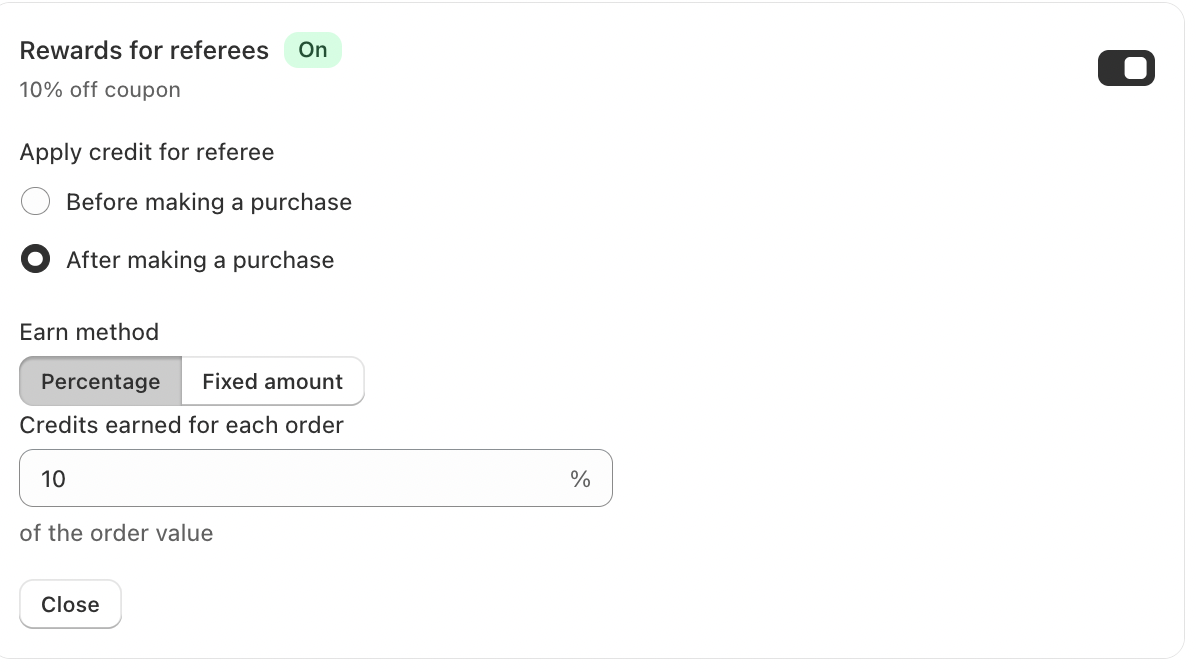
This is what the invited friend receives. Use the toggle to turn referee rewards On or off. When it's off, friends who use a referral link shop like any other customer, and only the referrer is rewarded.
Apply credit for referee decides when the friend gets their credit:
- Before making a purchase: the friend receives credit as soon as they sign in, so they can use it on their first order. This is a strong incentive to buy.
- After making a purchase: the friend receives credit after they place an order that meets your program conditions, ready for their next visit.
Then choose the Earn method and enter the Credits earned value, just as you did for referrers.
Note: Percentage is only available when credit is applied After making a purchase, because the reward is calculated from the order value. When credit is applied before a purchase, use Fixed amount.
Configure program settings
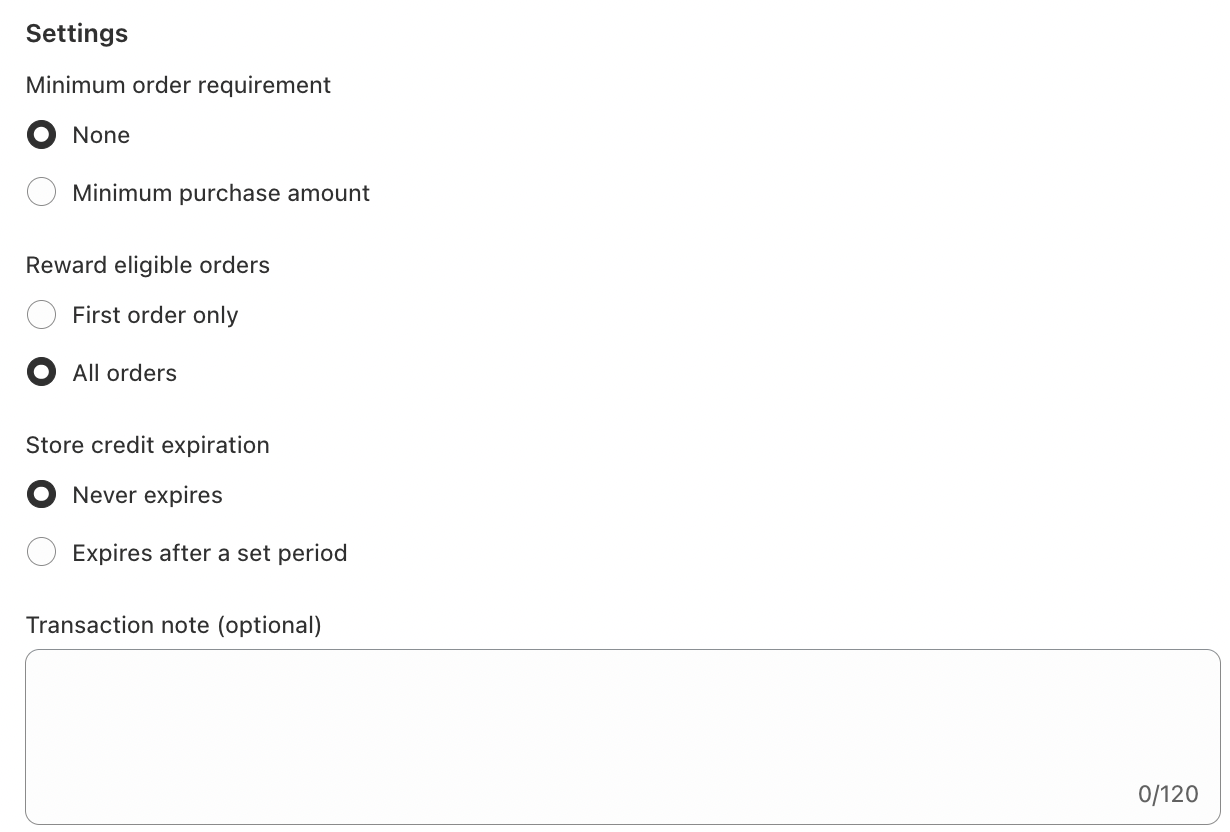
These settings apply to both referrers and referees.
Minimum order requirement Choose None to reward orders of any amount, or Minimum purchase amount to set the lowest order value that qualifies, in your store's currency. The referee's order must reach this amount before rewards are given.
Reward eligible orders
- First order only: credit is given only when the referee is a new customer placing their first order.
- All orders: credit is given for every referee order, including referees who have shopped with you before.
Store credit expiration Choose Never expires, or Expires after a set period and enter how many days, months, or years the credit lasts.
Transaction note (optional) Add a note of up to 120 characters. It's saved with each referral credit in the customer's earn history.
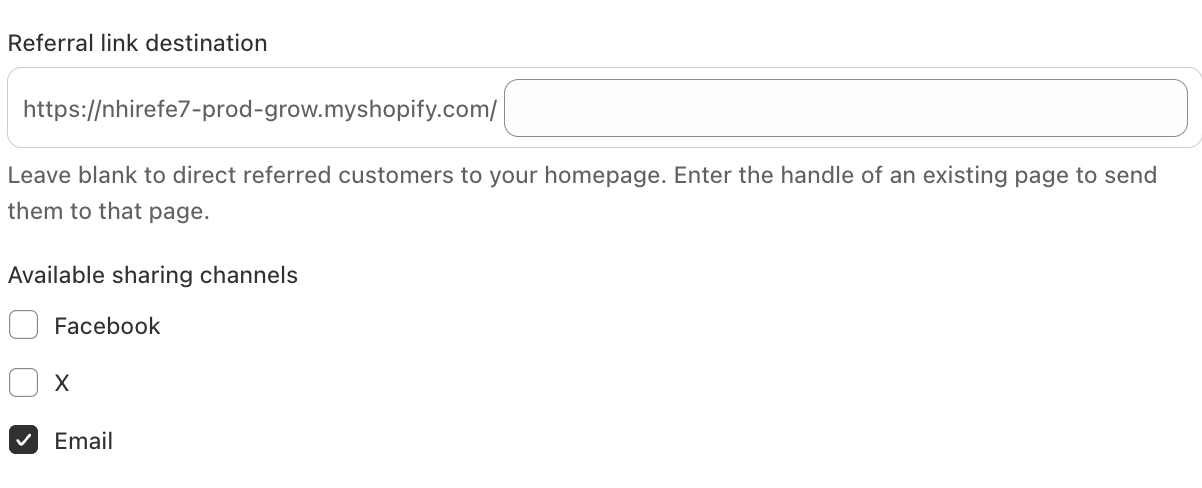
Referral link destination Choose where referral links send friends. Leave the field blank to send them to your homepage, or enter the handle of an existing page, such as a landing page for new customers.
Available sharing channels Tick the channels customers can share their link through: Facebook, X, and Email. When a customer clicks a channel's icon in the launcher, Referi asks them to sign in if they haven't, then opens a ready-made post or message containing their unique referral link.
What customers see in the launcher
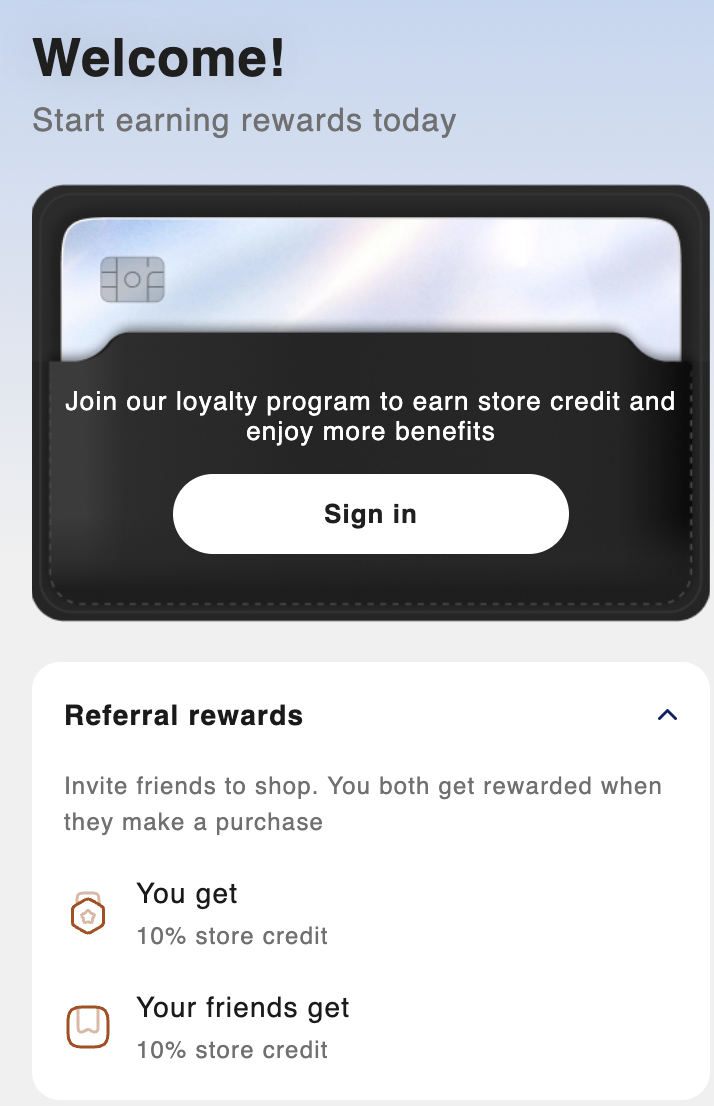
Once the program is activated, a Referral rewards section appears in the Referi launcher on your storefront. Its content is generated from your program settings, so there's nothing extra to write.
Visitors who aren't signed in see a short description of the program, what they get and what their friends get, plus a Sign in button to join.
Signed-in customers see:
- What they earn for each referral (You get).
- What their friends receive (Your friends get). This only appears when referee rewards are on.
- The conditions that apply, such as a minimum order or first order only.
- Their own unique referral link, plus share buttons for the channels you enabled.
Friends arriving through a referral link see the launcher open automatically:
- With Before making a purchase, they're told they've received a reward for being referred and asked to sign in to claim it. Their credit is added as soon as they sign in.
- With After making a purchase, they're asked to sign in, and told their reward arrives after they complete a qualifying order.
Track referral credit
Every referral reward is recorded in the customer's earn history. You can see it in Apps > Referi > Customers, and customers can see it under Activity in the launcher.
| Field | What it shows |
|---|---|
| Date | For referees, the date they were referred. For referrers, the date the referral succeeded. |
| Type | Received |
| Event | Adjustment |
| Origin | Referrer or Referee, depending on who earned the credit |
| Amount | The credit earned |
| Balance | The customer's remaining credit balance |
| Expired date | Based on your program's store credit expiration setting |
| Note | The transaction note you added, if any |
If you've set up the Credit received email in Customization, customers also get an email each time they earn referral credit.
You're all set
Activate the program, set rewards that feel worth sharing, and let your happiest customers bring in their friends. Check the Summary panel once more before you go live, and your referral program is ready to grow your store.
Need help?
If you have any questions or need assistance, please feel free to contact us at [email protected]. We’ll be happy to help