How to Set Up VIP Tiers in Referi
VIP tiers give your customers something to work toward. As they spend more with your store, they move up through tiers and unlock better rewards, which keeps them coming back and makes every purchase feel more rewarding.
How VIP tiers work
Each tier has an entry requirement, such as spending $500 at your store. Customers are placed in a tier automatically based on their activity from your program start date, and they move up as they reach each new requirement.
The reward for climbing higher is bonus store credit. Each tier has its own credit multiplier. Whenever a customer earns store credit from your other programs, such as placing an order, Referi multiplies it by their tier's multiplier and adds the extra as a VIP tiers bonus.
Example: A customer earns $10 in store credit for placing an order. They're in a tier with a ×3 multiplier, so they receive two credits:
- Place order: $10
- VIP tiers bonus: $20
That's $30 in total, three times the standard reward.
Open and activate VIP tiers
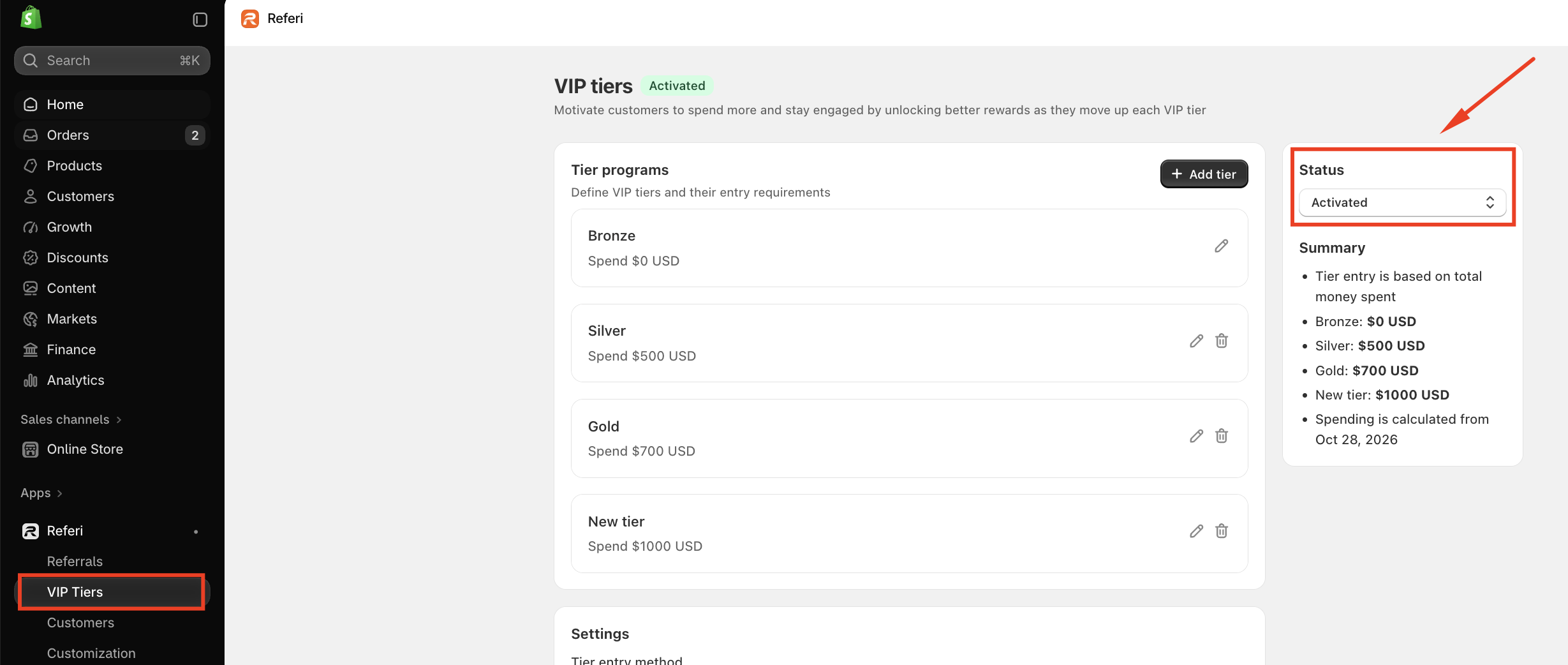
- In your Shopify admin, go to Apps > Referi > VIP Tiers.
- Under Status on the right, change the program to Activated.
Set up your tiers
Under Tier programs, you'll find three ready-made tiers to start from: Bronze, Silver, and Gold. You can use them as they are or adjust them to fit your store.
- Edit a tier: click the pencil icon to change its name, entry requirement, or credit multiplier.
- Add a tier: click Add tier to create another level, for example a top tier for your biggest spenders.
- Delete a tier: click the trash icon next to it.
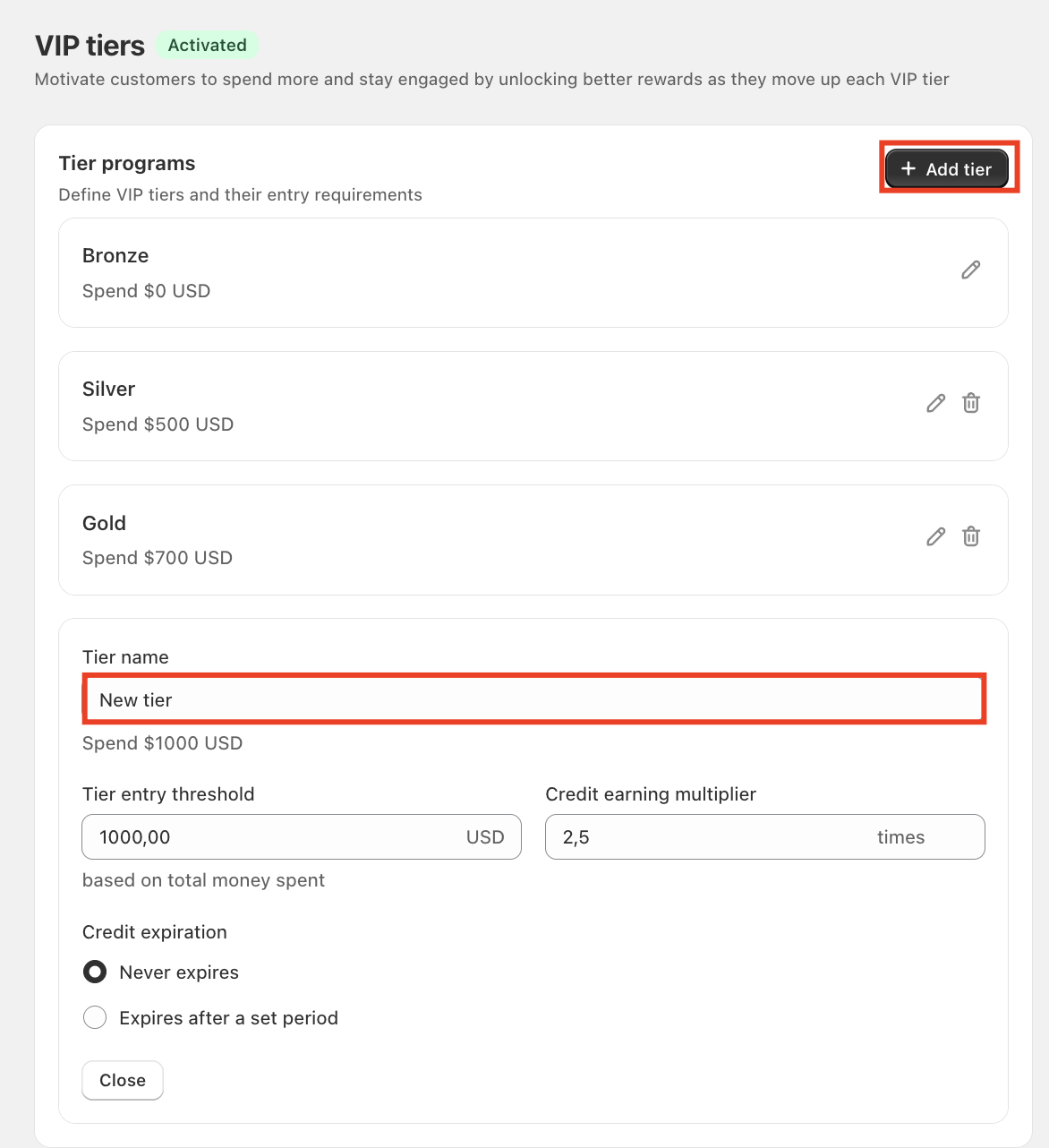
Note: Your program always needs a starting tier with a $0 requirement, so every customer has a tier from day one. That's why the Bronze tier can be edited but not deleted.
Tip: Space your requirements so each next tier feels reachable. If the gap is too big, customers may lose interest before they get there.
Configure program settings
Tier entry method
Choose how customers qualify for each tier:
- Money spent (default): based on the total amount a customer has spent at your store.
- Credit earned: based on the total store credit a customer has earned.
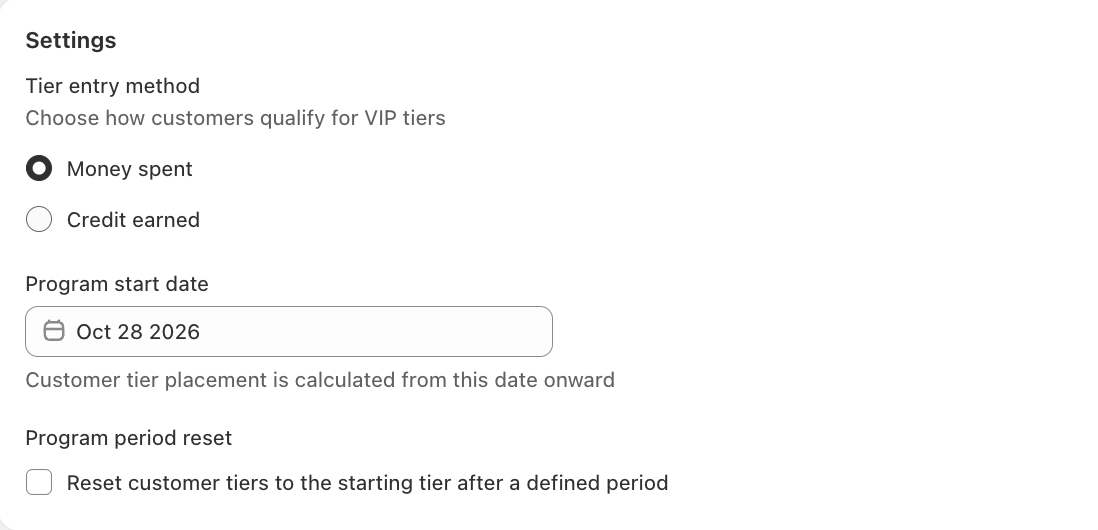
Program start date
This is the date Referi starts counting from when placing customers into tiers. It's set to today by default. Click the field to choose a different date from the calendar.
Program period reset
By default, customers keep their tier. Tick Reset customer tiers to the starting tier if you want tiers to restart at the end of each period, giving customers a reason to stay active. Then choose the period:
- A rolling year (default): 12 months (365 days) from the day each customer joined your VIP program.
- A calendar year: January 1 to December 31. Tiers reset every January 1.
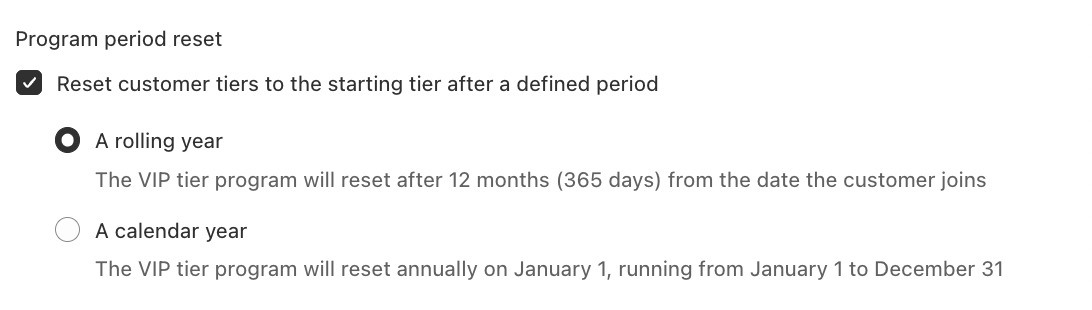
When a period ends, customers return to the starting tier, with one exception: customers in your highest tier move down only one tier instead of back to the start. Your most loyal customers keep some of their status as a thank-you.
Keep customers informed
- VIP tiers announcement email: when enabled, customers get an email each time they unlock a new tier, letting them know about their upgrade and new benefits. Set it up in Customization.
- Credit received email: when enabled, customers are also emailed whenever they earn store credit, including VIP bonus credit.
Track VIP bonus credit
Every bonus is recorded in the customer's earn history in Apps > Referi > Customers.
| Field | What it shows |
|---|---|
| Type | Received |
| Origin | VIP tiers bonus credit |
| Amount | The bonus credit earned |
| Balance | The customer's remaining credit balance |
| Expired date | Based on your VIP tiers expiration setting |
| Note | Your internal note, if you added one |
You're all set
Activate the program, shape tiers your customers can realistically reach, and give each one a multiplier worth chasing. Check the Summary panel once more, and your VIP program is ready to turn regular shoppers into loyal fans.
Need help?
If you have any questions or need assistance, please feel free to contact us at [email protected]. We’ll be happy to help.