How Customers Use Rewards as Store Credit at Checkout
Customers can redeem their Referi rewards as store credit toward any purchase, but they need to apply it themselves at checkout.
How customers apply store credit
Redeeming store credit takes three steps at checkout:
-
Sign in to their customer account on your store.
-
Add products to the cart and proceed to checkout.
-
Select Store credit to apply their available balance to the order.
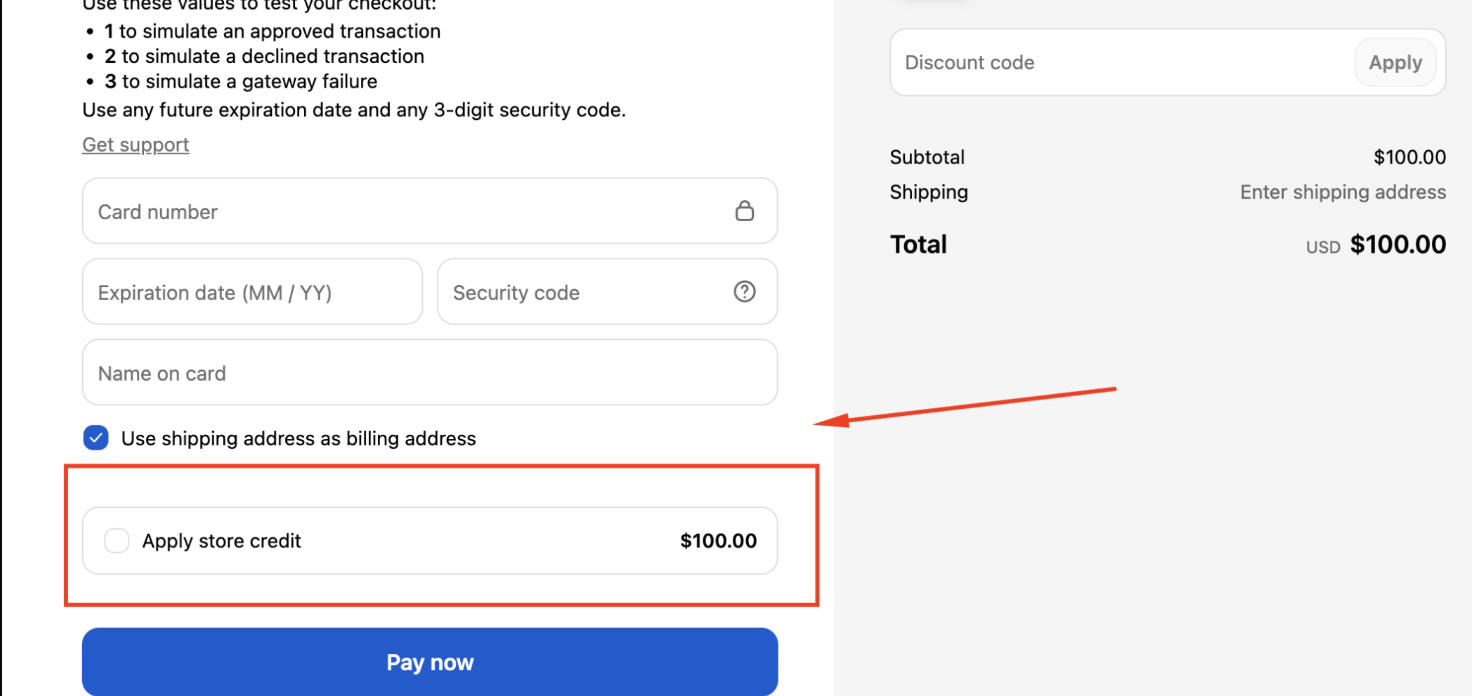
Store credit is not deducted automatically. If the customer doesn't select the Store credit option, the order is charged in full and the balance stays in their account for next time.
Checking balances and when the option appears
You can see every customer's available balance in Referi > Customers.
The Store credit option shows on the checkout page only when the customer has an available balance. Once credit has been added to their account, they can use it at checkout, as long as all other checkout requirements are met.
Frequently asked questions
-
Why wasn't my customer's store credit applied to their order? Store credit isn't applied automatically. The customer has to select the Store credit option at checkout before placing the order.
-
Why can't my customer see the Store credit option at checkout? Store credit usually doesn't appear at checkout because one of the required conditions isn't met. Check these requirements first:
-
Store credit must be turned on in your store settings.
-
The customer must be signed in through customer accounts or use Shop Pay.
-
Your store must be using customer accounts, not legacy customer accounts.
-
The customer must have an available store credit balance. You can confirm it in Referi > Customers.
- Where can I see how much credit a customer has? Go to Referi > Customers and find the customer to view their available balance.
If you have any questions or need assistance, please feel free to contact us at [email protected]. We’ll be happy to help.