How to Set Up the Credit Received Email in Referi
The credit received email lets customers know the moment they earn store credit, whether from a successful referral or a balance adjustment. A clear, friendly email reminds them they have credit waiting, shows them how to use it, and gives them a reason to come back and shop.
Open the email editor
- In your Shopify admin, go to Apps > Referi > Customization.
- Under Referral reward emails, find Credit received email and click Set up.
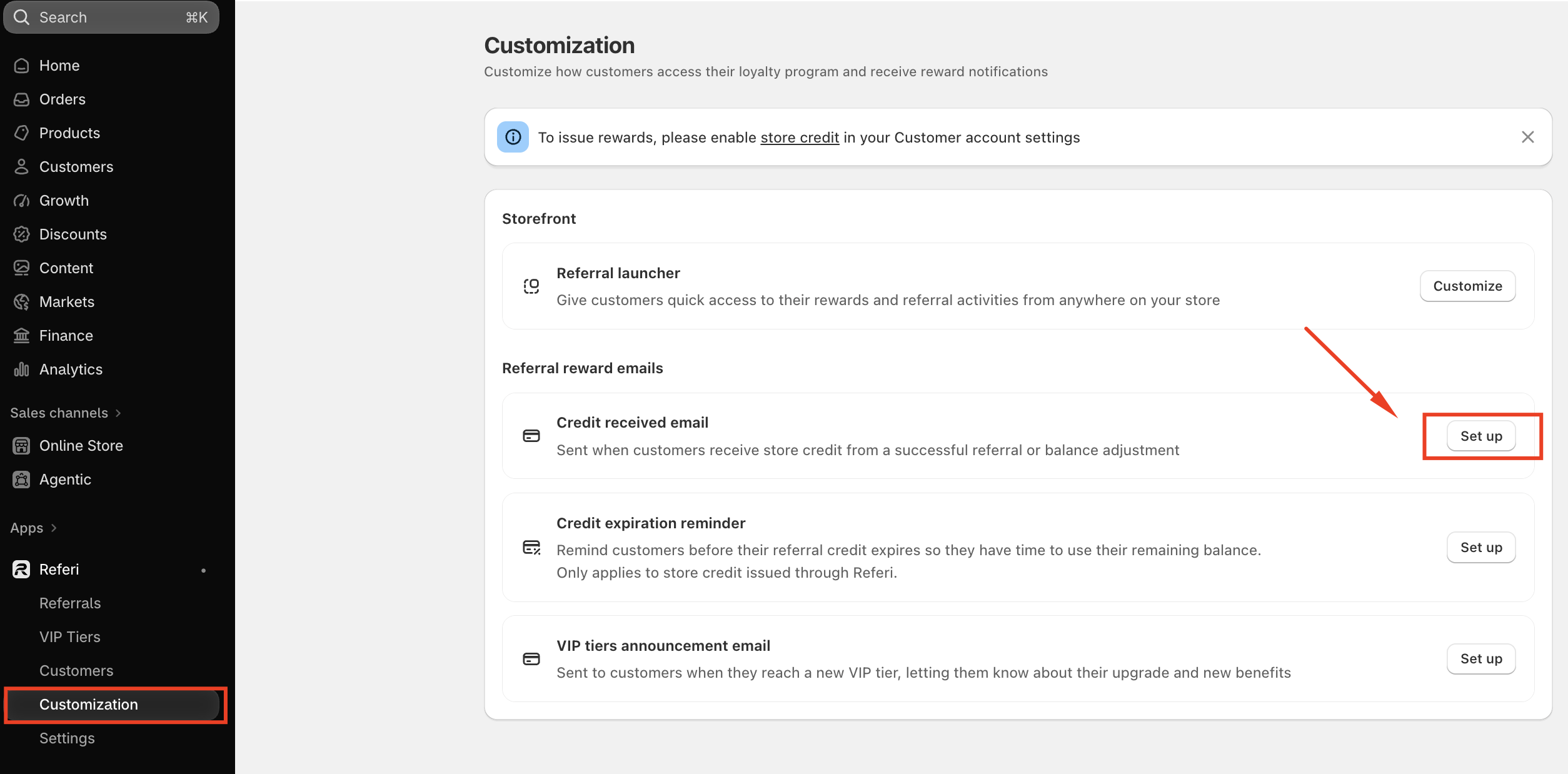
The editor opens with settings on the left and a live preview on the right, so you can see each change as you make it.
Note: Make sure store credit is enabled in your Shopify customer account settings. If you see a banner asking you to enable it, click the store credit link and turn it on. Without it, customers can't receive rewards, so this email won't be sent.
Email header
The header controls what customers see in their inbox before they open the email.
- Reply-to email: where customer replies go. Change it to your own support address so customers can reach you directly.
- Email subject: the subject line, up to 120 characters. The default is
You've earned {credit_amount} in referral rewards from {store_name}.
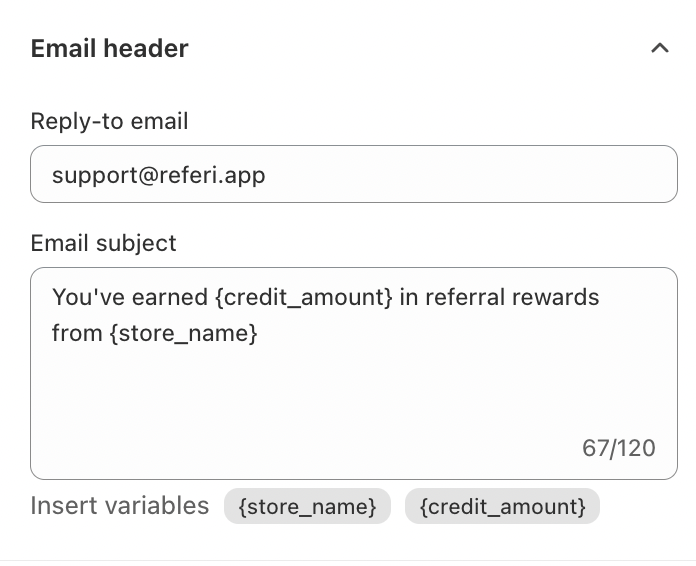
You can use two variables in the subject: {store_name} for your store's name and {credit_amount} for the amount of credit the customer earned. Click a variable to insert it, and Referi fills in the real value for each customer.
Main content
The main content is the body of the email.
| Field | What it does | Default |
|---|---|---|
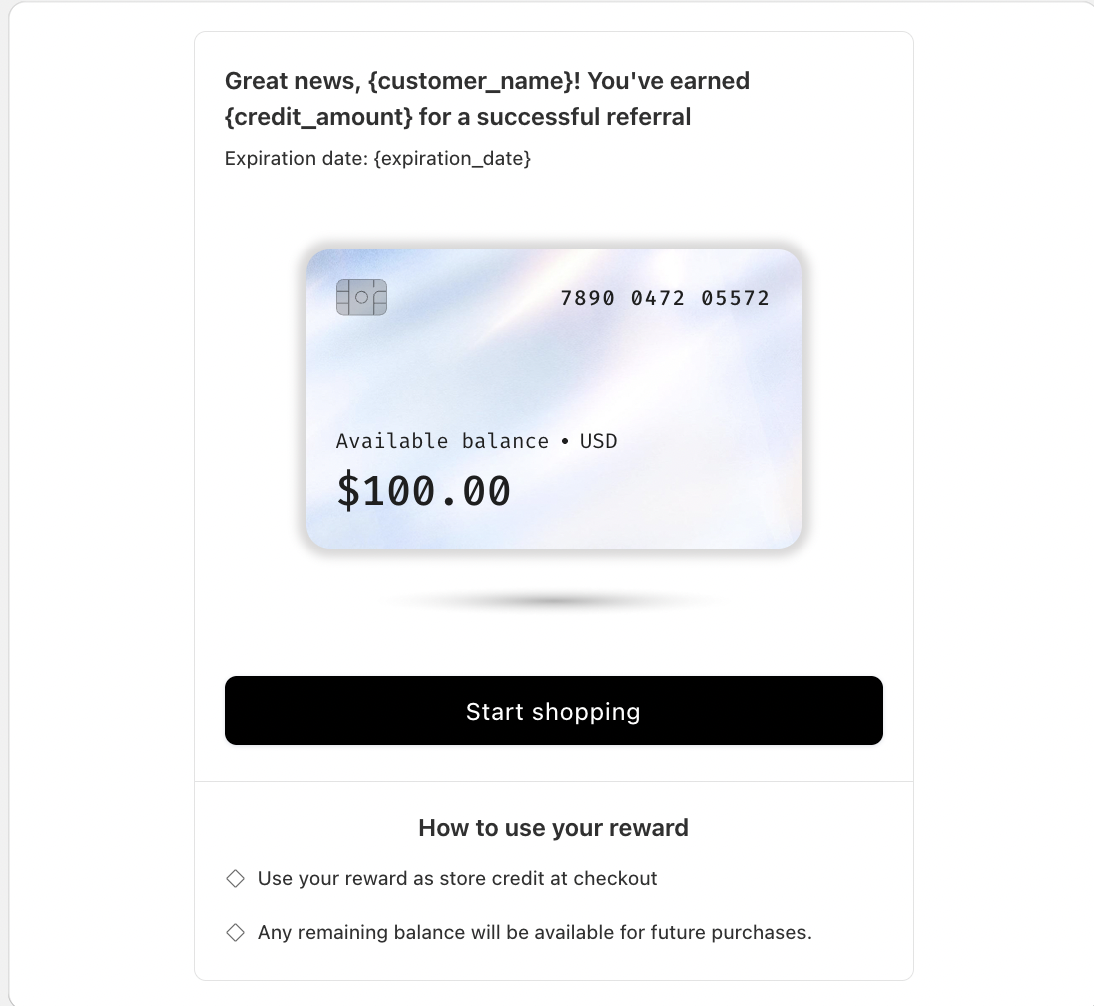
| Heading | The headline, up to 500 characters. Supports {customer_name}, {credit_amount}, and {store_name}. | Great news, {customer_name}! You've earned {credit_amount} for a successful referral |
| Store credit received has an expiration date | Shown under the heading when the credit expires. Use {expiration_date} to show the date. | Expiration date: {expiration_date} |
| Store credit never expires | Shown instead when the credit has no expiry | NO EXPIRY |
| Instruction title | A heading for the how-to section | How to use your reward |
| Instruction | Tells customers how to use their credit, up to 300 characters. Put each tip on its own line, and each line appears as a separate point. | Use your reward as store credit at checkout. Any remaining balance will be available for future purchases. |
Referi picks the right expiration text automatically, based on whether the customer's credit has an expiry date.
Wallet information
The email shows a wallet card with the customer's balance, followed by a button that brings them back to your store.
- Balance title: the label above the balance on the card. The default is "Available balance".
- CTA button content: the text on the button. The default is "Start shopping".
Color settings
Match the button to your brand with a hex code and opacity for each color:
- CTA background color: the button's fill. The default is black (#000000).
- CTA text color: the button's text. The default is white (#FFFFFF).
Keep strong contrast between the two so the button stays easy to read.
Preview and save
Check the preview on the right before you save. At the top, it shows your store name, the subject line, and the reply-to address. Below that is the full email as customers will see it: the heading, expiration text, wallet card, button, and how-to section.
When everything looks right, save your changes. From then on, Referi sends this email automatically whenever a customer receives store credit from a successful referral or a balance adjustment.
Tips for a better email
- Use
{customer_name}in the heading. A personal greeting feels warmer and gets more attention. - Show the amount in the subject. Including
{credit_amount}tells customers at a glance that something valuable is waiting. - Keep instructions short. Two or three clear lines on how to use the credit are enough.
- Use your own reply-to address. Customers may reply with questions, so make sure replies reach your team.
Need help?
If you have any questions or need assistance, please feel free to contact us at [email protected]. We’ll be happy to help.